Overview
When using AI SDR with Podcast Method or Interview Method campaigns, you can choose which type of call the AI should book. This setting determines whether prospects are invited to a shorter pre-qualifier call or directly to the full podcast or interview session.
What You'll Configure
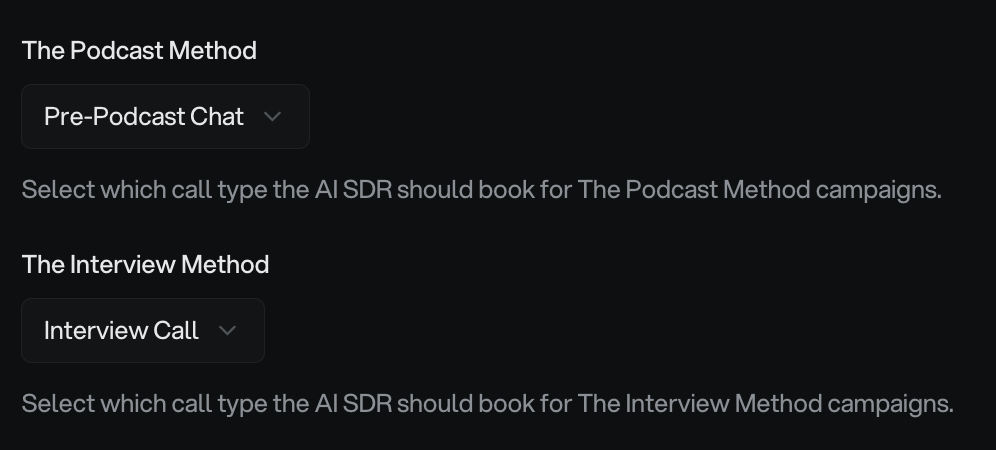
In Settings > AI SDR Agent, you'll find two dropdown menus:
Podcast Method: Choose between Pre-Podcast Chat (30 min) or Podcast Call (45 min)
Interview Method: Choose between Pre-Interview Call (30 min) or Interview Call (45 min)
These settings apply to all campaigns of each method type. Once saved, the AI SDR will automatically propose the selected call type when booking appointments.
Understanding Your Options
Pre-Qualifier Calls (Pre-Podcast Chat / Pre-Interview Call)
These 30-minute calls act as a lighter discovery session before the full podcast or interview. Choose this option when you want to:
Qualify prospect fit and interest level before committing to a full session
Discuss topic ideas and alignment in a shorter format
Build rapport before the longer, recorded conversation
Screen for guests who may not be a good match
Direct Calls (Podcast Call / Interview Call)
These 45-minute calls are the full podcast or interview session. Choose this option when you want to:
Skip the qualifier step and book directly to the main event
Streamline the process for high-intent prospects
Reduce friction and scheduling back-and-forth
Move faster from initial contact to recorded content
Many users start with pre-qualifier calls to test guest fit, then switch to direct booking once their targeting is dialed in and most prospects convert well.
How to Set Call Types
Follow these steps to configure your preferred call types:
Navigate to your organization dashboard
Click Settings in the sidebar
Select AI SDR Agent
Scroll to the Podcast Method dropdown and select your preferred call type
Scroll to the Interview Method dropdown and select your preferred call type
Click Save Settings at the bottom of the page
You'll see a green confirmation message when your settings save successfully.
Once saved, the AI SDR will use these call types immediately for new conversations. Existing active conversations will continue with their original settings.
Prerequisites
Before configuring call types, make sure you have:
A Pro or Legacy Pro plan (required for AI SDR features)
At least one team member with Google Calendar connected
Campaigns created in the Cold Email Agent (not imported from Instantly)
Campaigns synced from Instantly don't include method data, so the AI SDR will default to pre-qualifier calls. To use your selected call types, create campaigns directly in the Cold Email Agent.
How the AI SDR Uses Call Types
When the AI SDR processes prospect replies:
It detects the campaign method (Podcast or Interview)
It proposes the call type you selected in settings
It generates a calendar booking link for the appropriate duration
When booked, it creates a CRM deal at the corresponding stage (e.g., "Podcast Call Booked")
The AI automatically uses the configured call handler (or the campaign owner if set to Automatic) for appointment scheduling. Learn more about how booking logic works.
Common Questions
Can I customize call durations or create new call types?
No. The call types are pre-set with fixed durations: 30 minutes for pre-qualifier calls and 45 minutes for full sessions. Custom durations aren't currently supported.
Why is the AI booking the wrong call type?
If the AI is booking pre-qualifier calls when you've selected direct calls, check if your campaigns were created in the Cold Email Agent. Campaigns imported from Instantly don't carry method data and will default to pre-calls. Recreate the campaign in the Cold Email Agent to resolve this.
Does the AI make outbound calls?
No. The AI SDR only responds to inbound prospect replies and books calendar appointments. It doesn't place phone calls.
Related Resources
AI SDR Overview - Learn about inbox management and escalations
Setting Up AI SDR with Google Calendar - Connect your calendar for booking
Appointment Booking Logic with Google Calendar - Understand how availability works